
Common Issues with VPS Login Failures

  There are several reasons why a remote connection to a VPS might fail. Common issues and solutions include:

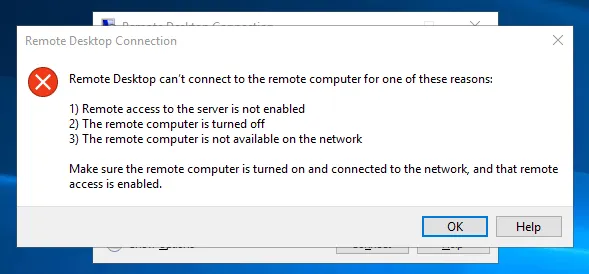
·Remote Access Failure
  

1.1.png

  Solutions::

  1 Open the WikiFX APP, go to [My] - [My VPS] to check if the VPS status is normal. If the VPS has been reclaimed, access is no longer possible. If the status is normal, verify that the IP entered is correct.

  2 If the VPS is active and the IP is correct, check if there's a normal network communication from your local machine to the VPS.

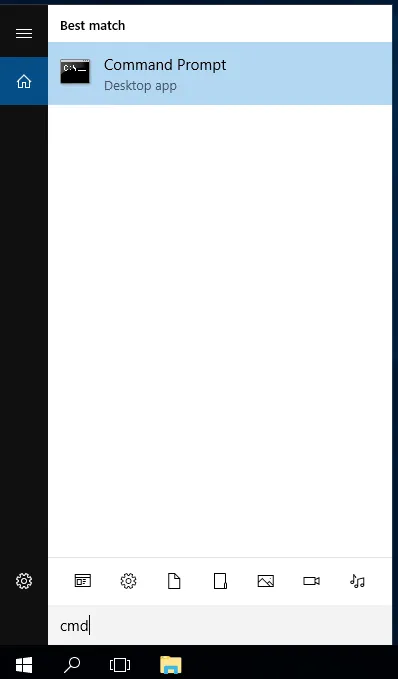
  Method: Type “CMD” in the run area or search bar to open the DOS command window.
  

2.png

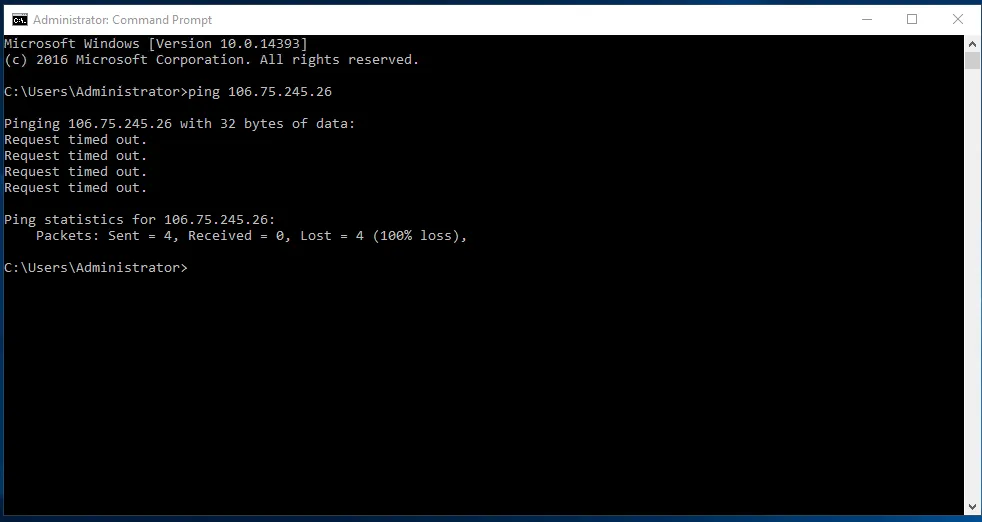
  Enter “ping + vps ip”, then press enter.
  

3.png

  If “Request timed out” appears, it indicates poor network communication between your local machine and the VPS. Consider changing your local network or canceling and re-opening a VPS in another region.

  If connection speed is normal but issues persist, contact online customer service for assistance.


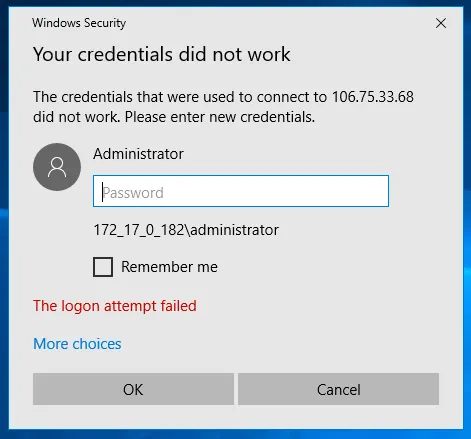
·Username or Password Verification Failure
  

4.1.png

  Solutions::

  1 Open WikiFX APP, go to [My] - [My VPS], and check if the username and password for your VPS is entered correctly.

  2 If the username and password are correct, try restarting your VPS or changing its password before attempting to log in again.

  Note: When setting a VPS password, use a complex combination of letters, numbers, and special characters to prevent easy breaches.

  Weak Password Example: Aa123456

  Strong Password Example: U7bq&uk$ZR8GLwAr


ملک یا خطہ منتخب کریں
  • tw.wikifx.com

  • ریاستہائے متحدہ امریکہ

    us.wikifx.com

  • کوریا

    kr.wikifx.com

  • برطانیہ

    uk.wikifx.com

  • جاپان

    jp.wikifx.com

  • انڈونیشیا

    id.wikifx.com

  • ویتنام

    vn.wikifx.com

  • آسٹریلیا

    au.wikifx.com

  • سنگاپور

    sg.wikifx.com

  • تھائی لینڈ

    th.wikifx.com

  • قبرص

    cy.wikifx.com

  • جرمنی

    de.wikifx.com

  • روس

    ru.wikifx.com

  • فلپائن

    ph.wikifx.com

  • نیوزی لینڈ

    nz.wikifx.com

  • بھارت

    in.wikifx.com

  • فرانس

    fr.wikifx.com

  • سپین

    es.wikifx.com

  • ملائیشیا

    my.wikifx.com

  • نائجیریا

    ng.wikifx.com

  • کمبوڈیا

    kh.wikifx.com

  • اٹلی

    it.wikifx.com

  • جنوبی افریقہ

    za.wikifx.com

  • ترکی

    tr.wikifx.com

  • نیدرلینڈز

    nl.wikifx.com

  • متحدہ عرب امارات

    ae.wikifx.com

  • کولمبیا

    co.wikifx.com

  • ارجنٹائن

    ar.wikifx.com

  • ایکواڈور

    ec.wikifx.com

  • مصر

    eg.wikifx.com

  • مراکش

    ma.wikifx.com

  • میکسیکو

    mx.wikifx.com

  • پیرو

    pe.wikifx.com

  • پاکستان

    pk.wikifx.com

  • تیونس

    tn.wikifx.com

  • وینزویلا

    ve.wikifx.com

  • عراق

    iq.wikifx.com

  • بولیویا

    bo.wikifx.com

  • بنگلہ دیش

    bd.wikifx.com

  • سعودی عرب

    sa.wikifx.com

  • برازیل

    br.wikifx.com

  • چلی

    cl.wikifx.com

  • کینیڈا

    ca.wikifx.com

  • گھانا

    gh.wikifx.com

  • کینیا

    ke.wikifx.com

  • سوڈان

    sd.wikifx.com

ریاستہائے متحدہ امریکہ
※ یہ ویب سائٹ مقامی قوانین و ضوابط کی پابندی کرتی ہے۔
آپ WikiFX ویب سائٹ پر تشریف لا رہے ہیں۔ WikiFX انٹرنیٹ اور اس کی موبائل پروڈکٹس عالمی صارفین کے لیے ایک کاروباری معلومات تلاش کرنے کا آلہ ہے۔ WikiFX پروڈکٹس استعمال کرتے وقت، صارفین سے درخواست ہے کہ وہ اپنے ملک اور علاقے کے متعلقہ قانونی ضوابط کی رضاکارانہ طور پر پابندی کریں۔
بروکرز کے خلاف شکایات، رپورٹنگ، سوالات اور تاثرات کے لیے ای میل: cs@wikifx.com، support@wikifx.com
لائسنس وغیرہ کی معلومات میں تصحیح کے لیے براہ کرم اس پتے پر معلومات بھیجیں: qa@wikifx.com
کاروباری تعاون: business@wikifx.com